This commercial photo booth buying guide explains the main features buyers should compare before ordering a self-service photography machine for a shopping mall, family entertainment center, arcade, cinema, tourist attraction or event venue.
A commercial photo booth can provide visitors with an interactive experience while producing printed or digital keepsakes. Depending on the selected configuration, customers may take photographs, choose templates, apply effects, print pictures or download images through a QR code.
However, photo booths are available with different cabinet designs, cameras, lighting systems, printers, payment methods and software functions. A practical commercial photo booth buying guide should consider the complete operating process rather than focusing only on the appearance of the machine.
Commercial Photo Booth Buying Guide: Define the Use Case
Before comparing models, identify where the photo booth will operate and how customers are expected to use it.
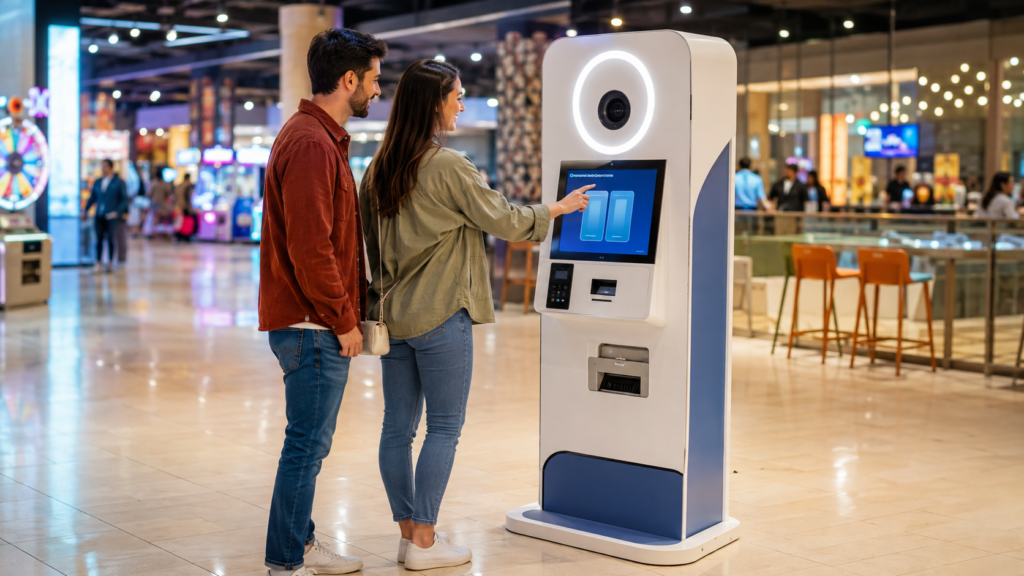
A compact open-style kiosk may be suitable for a shopping mall corridor, arcade entrance or retail location. An enclosed booth may provide more privacy, while a larger open booth can accommodate couples, families or groups of friends.
Buyers should answer several questions before requesting a quotation:
- Will the machine operate in an arcade, shopping mall, cinema or tourist venue?
- Will customers mainly want printed photos, digital images or both?
- How many people should fit into one photograph?
- Will the booth operate without an attendant?
- What payment method is normally used at the venue?
- Does the interface need more than one language?
- How much floor space is available?
- Is a stable internet connection available?
Clear answers help the manufacturer recommend a more suitable cabinet, printer, payment system and software configuration.
Tip 1: Choose Between an Open Kiosk and an Enclosed Booth
The cabinet structure affects visibility, privacy, installation space and the number of people who can use the machine.
An open photo booth is easy for passing customers to notice. It can work well in entertainment centers and shopping malls where visibility is important. Because there is no enclosed cabin, operators can normally monitor the equipment and clean the customer area more easily.
An enclosed booth provides a more private photography experience. Customers may feel more comfortable posing when they are separated from surrounding visitors. However, the booth may require more floor space and additional attention to lighting, ventilation and access.
Buyers should request the complete machine dimensions and recommended operating area. The available space should include room for customers to enter, pose, make payments and collect their photographs without blocking nearby walkways.
If the booth is intended for group photos, confirm the recommended shooting distance and the number of users that can fit comfortably within the camera frame.
Tip 2: Compare the Camera, Lighting and Image Quality
Image quality is one of the most important parts of the customer experience. A visually attractive cabinet cannot compensate for dark, blurred or poorly framed photographs.
This commercial photo booth buying guide recommends requesting recent sample photographs produced by the actual configuration being considered. Buyers should compare facial detail, color consistency, background exposure and image sharpness.
The camera position should match the expected users. A fixed camera may work for a clearly defined customer group, while other designs may provide a wider shooting area. If children and adults will both use the machine, ask how the framing accommodates different heights.
Lighting should illuminate faces evenly without producing harsh shadows. Compare the position, brightness and diffusion of the lighting system. The final result may also be influenced by the booth background, surrounding venue lighting and software processing.
Before ordering, ask the supplier to provide:
- Original sample photographs
- Images taken under normal indoor conditions
- Available camera specifications
- Lighting system details
- Supported photo sizes and resolutions
- Examples of filters, frames and templates
Reviewing real output is more useful than evaluating image quality from cabinet photographs alone.
Tip 3: Review the Screen, Interface and Customer Flow
The photo session should be easy to understand, especially when the machine operates without an attendant.
The touch screen should display clear instructions from the beginning of the session until the customer receives the finished image. A typical process may include payment, template selection, camera preparation, countdown, photo preview and printing or digital delivery.
Available functions vary by software configuration. Buyers should confirm whether the selected system supports features such as retaking a photograph, selecting multiple layouts, adding filters or choosing between print and digital delivery.
The interface language should match the target market. If the machine will be installed in a tourist destination or multilingual entertainment center, ask whether customers can select from several languages.
Also consider the total time required for one session. A complicated process can create queues during busy periods. Request an operating demonstration or video to understand the complete customer journey before approving the configuration.
Tip 4: Confirm the Printer and Consumable Requirements
If printed photographs are an important part of the business model, the printer requires careful evaluation.
A printer should produce consistent results while allowing staff to replace consumables without a complicated procedure. This commercial photo booth buying guide recommends comparing print quality, supported paper sizes, media capacity, replacement method and consumable availability.
Ask the supplier to identify the exact printer model included in the quotation. Confirm whether its consumables can be purchased locally or need to be ordered from a particular supplier.
Important questions include:
- What print sizes are supported?
- How many prints can one set of consumables produce?
- How are paper and other consumables replaced?
- Can the printer status be checked through the software?
- What routine cleaning does the printer require?
- Are operating videos or instructions available?
- What happens if the printer is temporarily unavailable?
Do not rely on a general printing-speed claim. Request a video showing the selected machine completing an actual session and producing a finished print.
Tip 5: Check QR Code and Digital Delivery Options
Some operators want customers to download their photographs to a mobile phone. Depending on the system, digital delivery may be provided through a QR code or another online method.
Confirm whether digital delivery is included in the standard software or offered as an optional function. Ask whether the system requires a continuous internet connection and what happens when the venue network is unavailable.
Buyers should also understand how image files are stored, transferred and deleted. Data-handling requirements may differ by country or region, so the operator should review the applicable privacy rules before enabling online photo delivery.
If QR code download is important, request a live demonstration using a mobile phone. Test the scanning process, download page, image quality and time required to receive the photograph.
The commercial photo booth buying guide should therefore evaluate digital delivery as a complete workflow, not simply as a feature listed in a product description.
Tip 6: Compare Payment and Operating Settings
The payment system should be compatible with the venue’s existing operation and the destination country.
Possible configurations may include coins, tokens, card readers or QR-based cashless payments. Availability depends on the selected machine and payment hardware, so buyers should confirm compatibility before ordering.
This commercial photo booth buying guide recommends checking the following operating settings:
- Supported currency or token specifications
- Price adjustment options
- Free-play or promotional modes
- Payment confirmation process
- Access to transaction or session records
- Staff access and password controls
- Error notifications
- Restart and recovery procedures
If the venue already uses a card or cashless management system, provide its technical information to the manufacturer. Do not assume that every third-party payment device can be connected without additional integration.
Buyers should also confirm how administrators change prices, templates and other operating settings. Request screenshots or a video of the management interface when possible.
Tip 7: Review Cabinet Construction, Power and Maintenance
A commercial photo booth may operate for many hours in a public location. The cabinet should support routine cleaning, inspection and maintenance.
Check the cabinet material, access doors, locks, ventilation openings and internal component layout. Staff should be able to reach the printer, computer, payment equipment and electrical components without dismantling unrelated parts of the machine.
Confirm the required voltage, frequency and plug type for the destination country. If the venue has specific electrical or safety requirements, share them with the supplier before production.
Ask which components require routine cleaning and how frequently the operator should inspect the camera lens, touch screen, printer and ventilation system. A basic maintenance schedule can help staff identify problems before they interrupt customer sessions.
Industry resources from IAAPA can also help venue operators learn about amusement facility operation, safety and visitor experience.
Before ordering, request:
- An operating manual
- Basic maintenance instructions
- Troubleshooting information
- A recommended spare-parts list
- Photos or videos of internal components
- Details of available technical support
These materials are particularly important when the machine will be installed far from the manufacturer.
Tip 8: Confirm Customization, Packaging and Shipping
Customization can help a photo booth match the visual identity and operating needs of a venue.
Depending on the model and order requirements, possible options may include cabinet colors, exterior graphics, interface languages, photo templates, voltage configuration and payment hardware. Any logos, characters or branded artwork should be supplied or authorized by the buyer.
This commercial photo booth buying guide recommends confirming every customization item in writing. Approved cabinet drawings, screen layouts and template examples can reduce misunderstandings before production begins.
International buyers should also request packaging information, including:
- Packed dimensions
- Gross weight
- Number of packages
- Packing method
- Assembly requirements
- Loading photographs
- Installation instructions
- Recommended shipping method
Confirm whether the machine can pass through the venue’s doors, elevators and corridors. A machine that fits the operating area may still be difficult to move into the building if access routes are narrow.
The supplier should also explain which parts need to be installed after delivery and which tools are required.
Questions to Ask Before Ordering
Prepare a written checklist and compare suppliers using the same questions.
Ask each supplier:
- Which camera, printer and computer configuration is included?
- Are printing and QR code downloads both supported?
- Which functions are standard and which are optional?
- Can the interface language be customized?
- Which payment methods are compatible?
- What voltage and plug will be supplied?
- Can recent photos and operating videos be provided?
- What consumables will be required?
- Are replacement parts available?
- What documents are included with the machine?
- How will the equipment be packed?
- What information is needed to calculate shipping?
- What support is available after delivery?
A detailed quotation should identify the selected configuration rather than describing the product only as a general photo booth.
Add a Photo Booth to a Balanced Entertainment Venue
A photo booth can complement commercial arcade machines by giving customers a different type of activity and a physical or digital souvenir from their visit.
Placement can affect customer attention. Suitable locations may include an entrance, prize counter, waiting area or another visible space where visitors naturally pause. The machine should remain accessible without restricting walkways or emergency routes.
Operators can also coordinate photo templates with seasonal events, venue promotions or authorized brand campaigns. Before planning frequent design changes, confirm how templates are uploaded and whether staff can manage them locally.
The right combination of photo booths, arcade games and other attractions depends on the venue size, customer profile and operating model.
Choose Commercial Photo Booths From LeChuang
LeChuang supplies commercial amusement equipment for arcades, family entertainment centers and other indoor venues. Buyers can discuss photo booth cabinet designs, software functions, payment options, voltage, language, printing requirements and packaging before placing an order.
Product photographs, operating videos and configuration details can be provided according to the selected model. International buyers should share their destination country, venue type, available space and required functions so that suitable options can be discussed.
Use this commercial photo booth buying guide as a checklist when comparing equipment. Contact LeChuang with your project requirements to request product information, customization options and a quotation.